
BaZi 四柱八字 · Chinese almanac 通书
Know your elemental blueprint. Know the right time to act.
Auspica works out your BaZi, the Four Pillars (四柱八字), from the date, time and place you were born, and reads it against the Chinese almanac, the old day-by-day calendar of what each day favours. Chinese terms kept, plain English alongside.
 iPhone coming soon
 Scan to get the app
meet.auspica.app/get
ALICE, YOU ARE
辛金 · Yin Metal
Refined metal: jewellery, not a sword. Precise, polished, quietly exacting. Born in a Water month, surrounded by Earth.
午MONTH戊
子DAY
未HOUR壬
辰
合婚 · COMPARE WITH SOMEONE
See how your chart sits with a partner, a friend or family. It takes their birth date, or they can send it.
Compare with someoneNot now
See my full chart
立春 · Li Chun
Your BaZi year starts at Li Chun, not Chinese New Year.
Li Chun, the start of spring, is an astronomical moment, not a date on the lunar calendar. Charts that use Chinese New Year instead can put your year pillar a whole animal out.
Auspica · BaZi year
未
Metal Goat year 辛未
Li Chun 立春 fell on 4 Feb 1991 at 16:08. A birth on 10 Feb 1991 comes after it, so the year pillar has already turned.
Lunar calendar · same day
庚午
Metal Horse year 庚午 · 腊月廿六
On the lunar calendar it is still the old year: Chinese New Year did not arrive until 15 Feb 1991.
Worked example: born 10 Feb 1991, noon, Singapore. Solar-term times in Auspica are astronomical, to the minute. Why the year starts at Li Chun →
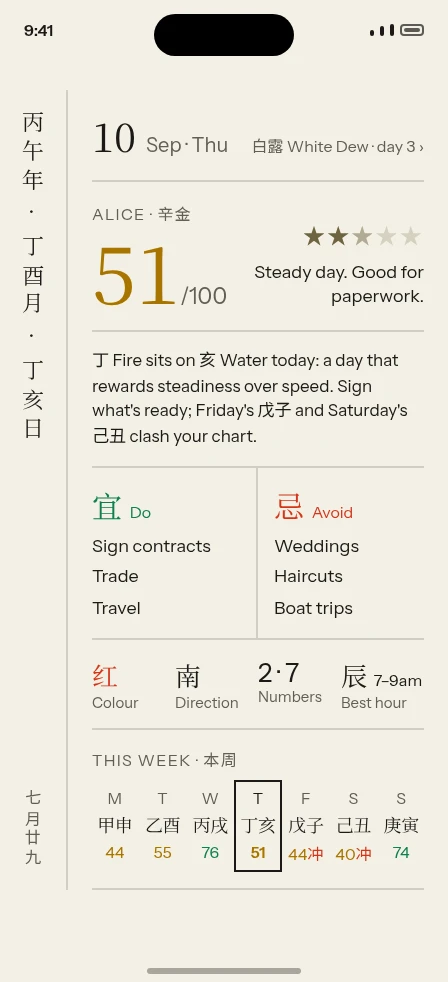
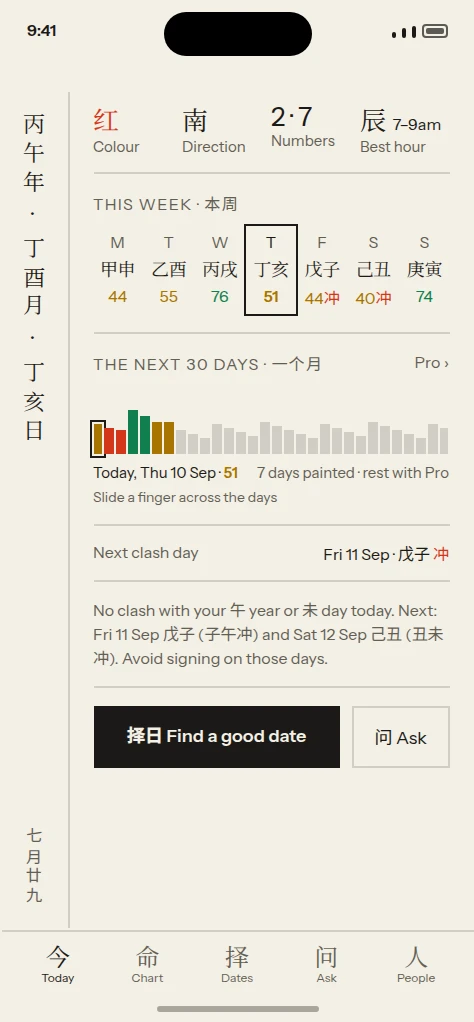
今日 · Today
The day, read against your chart
A rating out of 100 for you, not for everyone. The almanac's 宜 and 忌 filtered through your own pillars.
- Your 宜 / 忌 for the day, in Chinese and plain English
- Lucky colour, direction, numbers and best hour
- Clash days named in advance as watch-outs
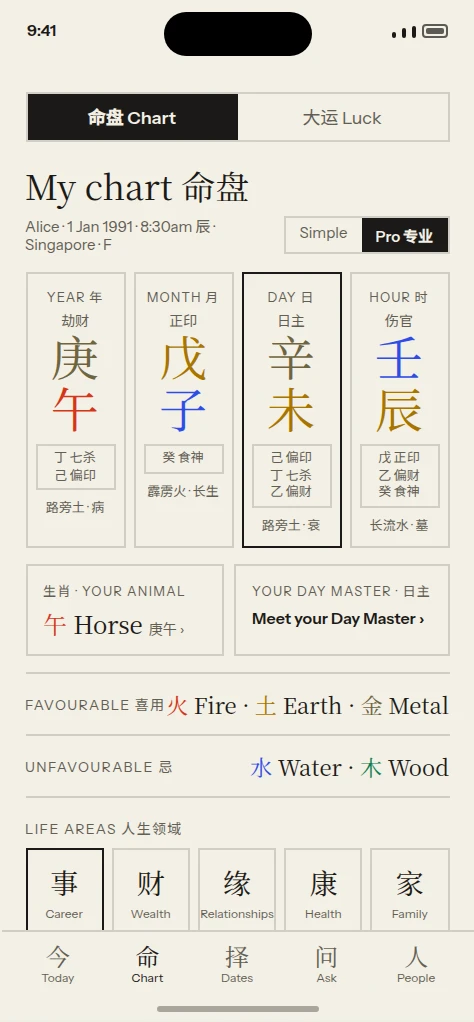
命盘 · My Chart
Four pillars, and what they weigh
Stems, branches and the balance of the five elements. Start Simple; switch to Pro when you want hidden stems and Ten Gods.
- Simple and Pro views of the same chart
- Element balance with favourable and unfavourable elements
- Tap any term for a plain-English explanation
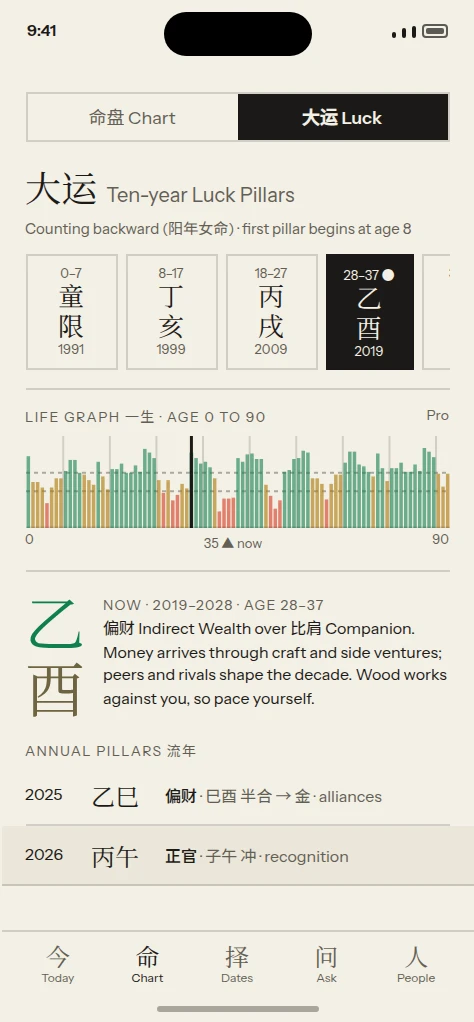
大运 · Luck Pillars
Ten-year chapters, and where you stand in one
Your luck pillars run in decades from a start age the engine works out from your birth. The timeline is free.
- The whole timeline, past and future decades
- The decade you are in now, with its years
- Annual pillars alongside the decade
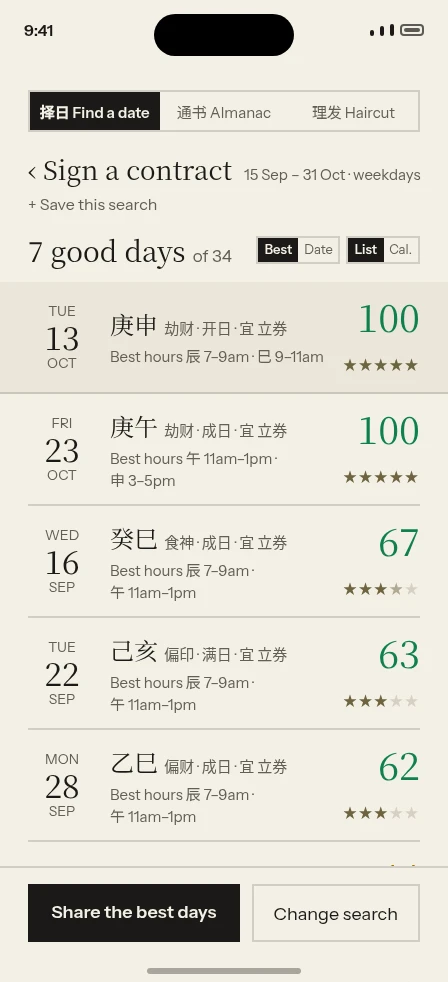
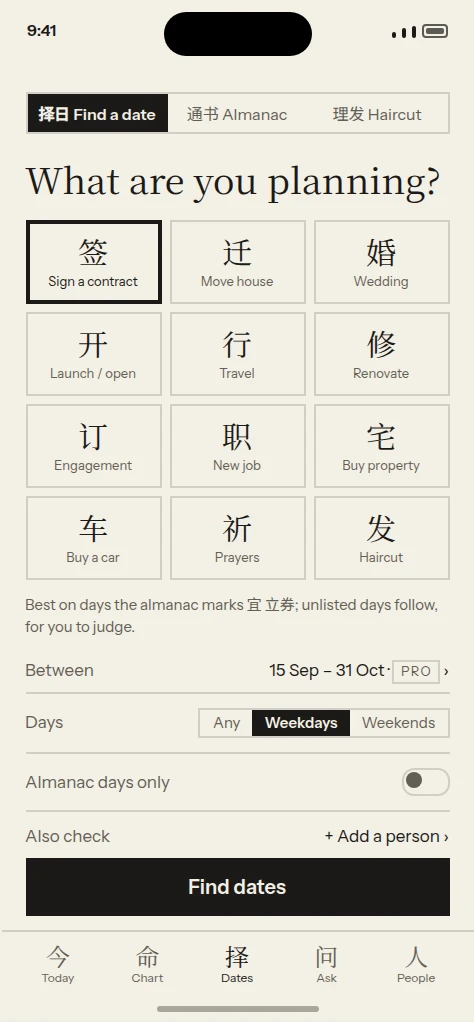
择日 · Date Finder
Pick the day before you commit to it
Choose an activity, a date range and everyone involved. Auspica ranks the days and tells you why each one scored as it did.
- Ranked dates with best hours
- A written reason for every date, and for every exclusion
- Check several people's charts at once
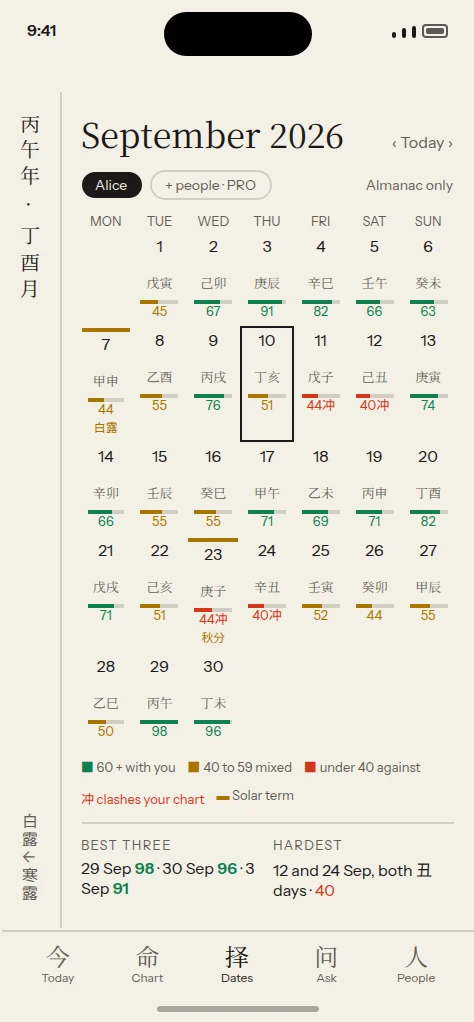
通书 · Almanac
The whole month, the old way
Day pillars, lunar dates, solar terms and festivals in one grid. Tap a day for its full entry.
- Solar terms marked on the exact local day
- Days that clash your chart flagged 冲
- Day detail with 宜 / 忌 and the hour strip
您的语言 · Your language
Chinese terms in 简体 or 繁體, with pinyin and English.
Read the chart the way you already think about it. The layout never changes, only the labels.
English
Day pillar · Day Master
未
Yin Metal over Goat
Metal · Earth · Roadside Earth · Decline
English + 中文
Day 日柱 · 日主
未
辛金 Yin Metal · 未 Goat
xīn wèi · 路旁土 Roadside Earth · 衰 Decline
中文 · 简体 / 繁體
日柱 · 日主
未
辛金 · 未土
路旁土 · 衰
Chinese terms, pinyin and English sit side by side throughout the app. A fully Chinese interface is not promised.
How it works
Three steps, about a minute
Enter your birth details
Date, time (or "I don't know") and place. The place sets the time zone, nothing else.
See your four pillars
Your Day Master and the balance of the five elements, explained in plain English.
Plan your days
Read the day against your chart, and find good dates for the things you are planning.
Exact solar-term times
Astronomical, to the minute, for your time zone, including Li Chun, where the BaZi year turns.
Settings you can see and change
Clock time by default, true solar time as an option. The day changes at midnight by default, 23:00 if you prefer. The method preset is "Classic (MY/SG)".
Your chart is calculated on your phone
It works without an account. Birth details leave your device only if you sign in to save and sync.
Signing in asks for an email address
Nothing more. Sign in with Apple or Google tells us your email address and an account identifier, used to save your charts and sync them to a new phone. Apple can hide your real address.
Delete your account and data at any time
In the app, on the web, or by email. Everything you entered goes with it.
Pricing
Free and Pro
Free
No account needed
- Your four-pillar chart, Simple view
- Today's almanac and your day rating
- The Luck Pillar timeline
- The almanac calendar
Pro
S$69.98 / year · S$9.98 / month
- Full readings and the Pro chart view
- Your personal 宜 / 忌 every day
- Luck Pillar and annual readings
- Date Finder for any range and several people
- More saved people
Read the whole chart
The four pillars and the Luck Pillar timeline stay free. Pro adds Luck Pillar readings, your own 宜 and 忌 every day, and Date Finder for any range and several people, in the app and on the web.
Pro works on the web and in the Android app today. The iPhone app is coming soon, and your subscription carries over to it.
This becomes your Auspica account, and where your receipt goes. Use the address you want to sign in with on your phone.
Nothing is charged today: the 7-day free trial starts now, and the first charge of S$69.98 is taken on day 7, when the trial ends. Billed securely by our payment processor. Renews automatically unless cancelled before the end of the period. Cancel any time from your account page. Prices in SGD; local tax may apply.
Subscribe on the web; Pro works there and in the Android app, and the iPhone app is coming soon. Cancel anytime from your account page.
Also in the app
Ask the Master, compatibility, the compass and flying stars come with Pro.
问 Ask the Master
Questions about your chart, answered from your own pillars, luck and today's almanac.
合 Compatibility
Two charts read side by side, and days that suit you both.
风水 Feng Shui
Your Kua directions, a compass of the 24 mountains, and this year's flying stars over your home.
Widgets
Today at a glance on your home screen.
FAQ
Questions people ask
What is BaZi?
BaZi, 四柱八字, is a Chinese system that describes the moment you were born as four pairs of characters: a year, month, day and hour pillar. Each pair is a heavenly stem over an earthly branch, and each carries one of the five elements. Read together they describe the balance you started with. Auspica calculates them from published calendar rules and astronomical solar-term times. What is BaZi? has the longer answer in plain words.
Is this fortune telling?
We treat it as a tradition for reflecting on patterns and timing, not as prediction. Readings describe tendencies and watch-outs; they don't tell you what will happen, and nothing here is guaranteed. Clashes are things to be aware of, not omens.
I don't know my birth time.
You can still get a chart. Without a birth time you get three pillars instead of four (year, month and day), and readings are tagged 3柱. Luck Pillar start ages become approximate. You can add the time later and the chart updates.
Why do you need my birthplace?
To get the hour right. The place tells us the time zone that applied where and when you were born, including historical clock changes, and it is what true solar time would be measured against if you turn that option on. Your location isn't tracked, and city data comes from GeoNames.
Why is my chart different from another app's?
Usually one of three conventions. Where the day boundary sits: midnight, or 23:00 with the 子 hour starting the next day. Whether the hour is taken from clock time or corrected to true solar time. And which school's method is used; ours is the "Classic (MY/SG)" preset. All three are in Settings, so you can match the chart you already know. Every step is set out on the Methods page.
Is my data private?
Your chart is calculated on your device, and the free chart needs no account. Birth details are copied to our servers only when you sign in to save and sync, and they are kept out of analytics. We don't sell personal data or show ads. See the Privacy Policy.
How do I cancel?
If you subscribed on the web, open your account page and use the billing portal. If you subscribed in the iPhone app, go to Settings → your name → Subscriptions. Either way, Pro lasts until the end of the period you have already paid for.
Can I use Auspica on Android?
Yes. Subscribe at meet.auspica.app, then sign in in the Android app, and Pro follows your account. The Android app has no in-app purchases.
The calendar your grandparents kept, worked out for your chart.
iPhone coming soon